

As an SMB connector supplier, I understand the importance of maintaining these components to ensure their long - term performance and durability. SMB (Sub - Miniature version B) connectors are widely used in various RF (Radio Frequency) applications, including telecommunications, test equipment, and wireless devices. In this blog post, I will share some practical tips on how to maintain an SMB connector to prolong its lifespan.
1. Proper Installation
The first step in maintaining an SMB connector is to ensure proper installation. Incorrect installation can lead to a variety of problems, such as poor electrical contact, signal loss, and mechanical damage.
- Alignment: When mating an SMB connector, make sure that the male and female parts are properly aligned. Misalignment can cause the pins to bend or break, which will severely affect the connector's performance. Take your time to visually check the alignment before applying any force.
- Torque: Use the correct amount of torque when tightening the connector. Over - tightening can damage the connector threads or cause the connector to break, while under - tightening can result in a loose connection and signal leakage. Refer to the manufacturer's specifications for the recommended torque values.
- PCB Mounting: If you are using a PCB - mounted SMB connector like the SMB Connector Male Type SMT PCB Mount SMB - JE, ensure that the PCB is clean and free of any debris or contaminants. The soldering process should be done carefully, following the proper temperature and time guidelines. Poor soldering can lead to cold joints, which can cause intermittent connections.
2. Environmental Considerations
The environment in which the SMB connector operates can have a significant impact on its lifespan.
- Temperature: Extreme temperatures can cause the materials in the connector to expand or contract, which can lead to mechanical stress and eventually damage. For example, in high - temperature environments, the plastic components of the connector may melt or deform, while in low - temperature environments, the metal parts may become brittle. Try to keep the operating temperature within the recommended range specified by the manufacturer.
- Humidity: High humidity can cause corrosion of the metal parts of the connector. Moisture can seep into the connector and react with the metal, forming rust or other corrosion products. This can degrade the electrical performance of the connector. If the connector is used in a humid environment, consider using a protective coating or enclosure to prevent moisture ingress.
- Dust and Debris: Dust and debris can accumulate in the connector, causing interference with the electrical contacts. This can lead to signal degradation or even complete failure of the connector. Regularly clean the connector using a soft brush or compressed air to remove any dust or debris.
3. Handling and Storage
Proper handling and storage of SMB connectors are also crucial for their longevity.
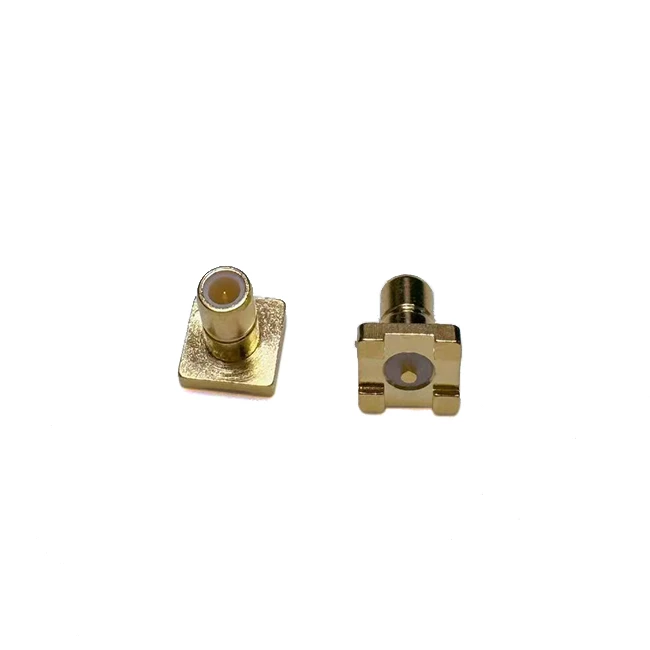

- Handling: When handling SMB connectors, avoid touching the contact surfaces with your fingers. The oils and moisture on your fingers can contaminate the contacts, which can lead to poor electrical performance. Use appropriate tools, such as tweezers or pliers, to handle the connectors. Also, be careful not to drop or subject the connectors to excessive shock or vibration, as this can cause internal damage.
- Storage: Store SMB connectors in a clean, dry, and static - free environment. Use anti - static bags or containers to protect the connectors from electrostatic discharge (ESD). ESD can damage the sensitive electronic components inside the connector. Label the storage containers clearly to ensure easy identification and retrieval.
4. Regular Inspection
Regular inspection of SMB connectors is essential to detect any potential problems early on.
- Visual Inspection: Conduct a visual inspection of the connector regularly. Look for signs of physical damage, such as bent pins, cracked housings, or loose parts. Check the contact surfaces for signs of corrosion or wear. If any damage is detected, replace the connector immediately to prevent further problems.
- Electrical Testing: Periodically perform electrical tests on the connector to ensure its proper functioning. Use a network analyzer or other appropriate test equipment to measure the insertion loss, return loss, and other electrical parameters. Compare the test results with the manufacturer's specifications. If the results are outside the acceptable range, the connector may need to be replaced.
5. Cleaning
Cleaning the SMB connector is an effective way to maintain its performance and prolong its lifespan.
- Contact Cleaning: Use a suitable contact cleaner to clean the contact surfaces of the connector. Apply the cleaner to a soft cloth or cotton swab and gently wipe the contacts. Avoid using abrasive materials, as they can scratch the contacts and damage the plating. After cleaning, allow the connector to dry completely before reconnecting it.
- Housing Cleaning: Clean the housing of the connector using a mild detergent and water. Rinse the housing thoroughly and dry it with a soft cloth. Make sure that no moisture remains inside the connector.
6. Compatibility
Ensure that the SMB connector is compatible with the other components in the system.
- Impedance Matching: The impedance of the SMB connector should match the impedance of the transmission line and the connected devices. Mismatched impedance can cause signal reflections, which can lead to signal loss and degradation. For example, if you are using a 75 - ohm system, make sure to use a 75ohm SMB Connector Male Type PCB Mount SMB - 75JE.
- Frequency Range: Check the frequency range of the SMB connector and ensure that it is suitable for the application. Using a connector with an inappropriate frequency range can result in poor performance.
Conclusion
Maintaining an SMB connector is not a complex task, but it requires attention to detail and proper procedures. By following the tips mentioned above, such as proper installation, environmental considerations, handling and storage, regular inspection, cleaning, and ensuring compatibility, you can significantly prolong the lifespan of your SMB connectors.
As a reliable SMB connector supplier, we are committed to providing high - quality products and professional technical support. If you have any questions about SMB connectors or need to purchase our products, please feel free to contact us for further discussions. We look forward to serving you and helping you find the best solutions for your RF applications.
References
- Manufacturer's datasheets for SMB connectors
- Industry standards for RF connectors and their maintenance