

Integrating an SMB connector into a smart home system can significantly enhance its functionality and connectivity. As an SMB connector supplier, I've seen firsthand how these connectors can transform the way a smart home operates. In this blog, I'll share some insights on how to integrate an SMB connector into a smart home system.
Understanding SMB Connectors
First things first, let's talk about what SMB connectors are. SMB stands for SubMiniature version B, and they're a type of RF (radio frequency) connector. They're known for their compact size, high - frequency performance, and quick - connect/disconnect feature. These connectors are commonly used in applications where space is limited, and reliable RF connections are required.
We offer a variety of SMB connectors, such as the 75ohm SMB Connector Male Type Right Angle PCB Mount SMB - 75JWE, the SMB Connector Male Type SMT PCB Mount SMB - JE, and the SMB Female Connector Right Angle for RG316 RG174 Crimp Type SMB - C - KW1.5. Each of these connectors has its own unique features and is suitable for different smart home applications.
Assessing Your Smart Home System's Needs
Before you start integrating an SMB connector, you need to assess your smart home system's requirements. Consider the following factors:
Frequency Requirements
Different smart home devices operate at different frequencies. For example, Wi - Fi routers typically operate at 2.4 GHz or 5 GHz, while some other wireless devices may use different frequency bands. Make sure the SMB connector you choose can support the frequency range of your smart home devices.
Power Handling
Some smart home devices may require connectors that can handle a certain amount of power. If your device has a high - power output, you need to select an SMB connector with appropriate power - handling capabilities.
Physical Space
Smart home systems often have limited physical space. You need to choose an SMB connector that fits well within the available space. Our right - angle connectors, like the 75ohm SMB Connector Male Type Right Angle PCB Mount SMB - 75JWE, are great for tight spaces.
Preparing for Integration
Once you've chosen the right SMB connector, it's time to prepare for integration.
Gather Tools
You'll need some basic tools for the integration process, such as a soldering iron (if you're using a PCB - mount connector), wire cutters, and a crimping tool (for crimp - type connectors). Make sure you have all the necessary tools on hand before you start.
Read the Manual
Each SMB connector comes with a user manual. Read it carefully to understand the installation process, including any specific requirements or precautions.
Integration Steps
Step 1: Identify Connection Points
Locate the areas in your smart home system where you need to make the RF connections. This could be on a circuit board, a wireless module, or a cable.
Step 2: Prepare the Connector and the Device
If you're using a PCB - mount connector, clean the PCB surface to ensure good soldering. If it's a crimp - type connector, strip the cable to the appropriate length and prepare it for crimping.
Step 3: Make the Connection
For PCB - mount connectors, carefully place the connector on the PCB and solder it in place. Make sure the soldering joints are clean and strong. For crimp - type connectors, use the crimping tool to attach the connector to the cable securely.
Step 4: Test the Connection
After making the connection, test the smart home device to ensure that the RF connection is working properly. You can use a signal tester or simply check if the device functions as expected.
Troubleshooting
Sometimes, you may encounter issues during the integration process. Here are some common problems and solutions:
Poor Signal Quality
If you're experiencing poor signal quality, check the soldering joints (if applicable) to make sure they're not loose or have a cold solder. Also, ensure that the connector is properly seated and there are no physical damages.
Interference
Interference can be caused by nearby electronic devices or incorrect grounding. Try re - positioning the device or improving the grounding to reduce interference.
Benefits of Using SMB Connectors in Smart Home Systems
Using SMB connectors in your smart home system offers several benefits.
Space - Saving
As mentioned earlier, their compact size makes them ideal for smart home applications where space is at a premium.
High - Frequency Performance
They can handle high - frequency signals, which is crucial for modern wireless smart home devices.
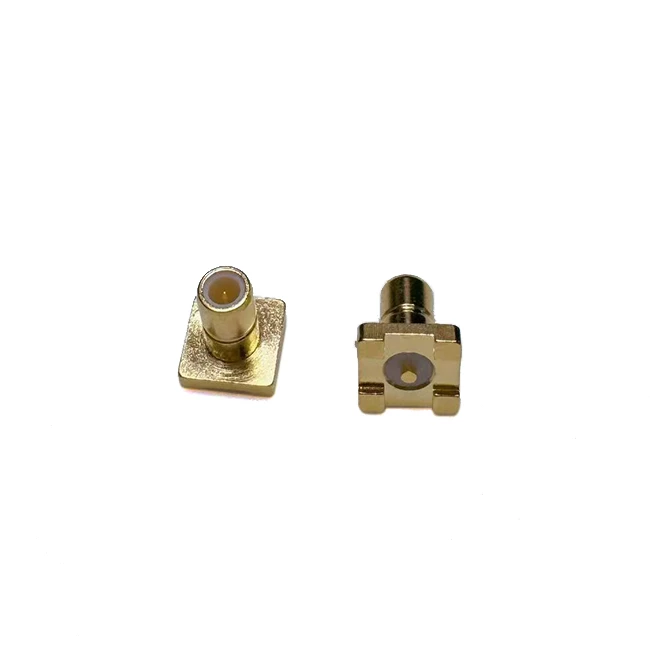

Easy Installation
With their quick - connect/disconnect feature, SMB connectors are relatively easy to install and replace, which can save you time and effort.
Conclusion
Integrating an SMB connector into a smart home system is a great way to enhance its connectivity and performance. By understanding your system's needs, choosing the right connector, and following the proper integration steps, you can ensure a successful installation.
If you're interested in purchasing SMB connectors for your smart home project, feel free to reach out to discuss your requirements. We're here to help you find the best solutions for your system.
References
- General knowledge on RF connectors and smart home technology from industry experience.